Commands
Type a slash command at the start of your message to trigger special actions. The commands below are built in.
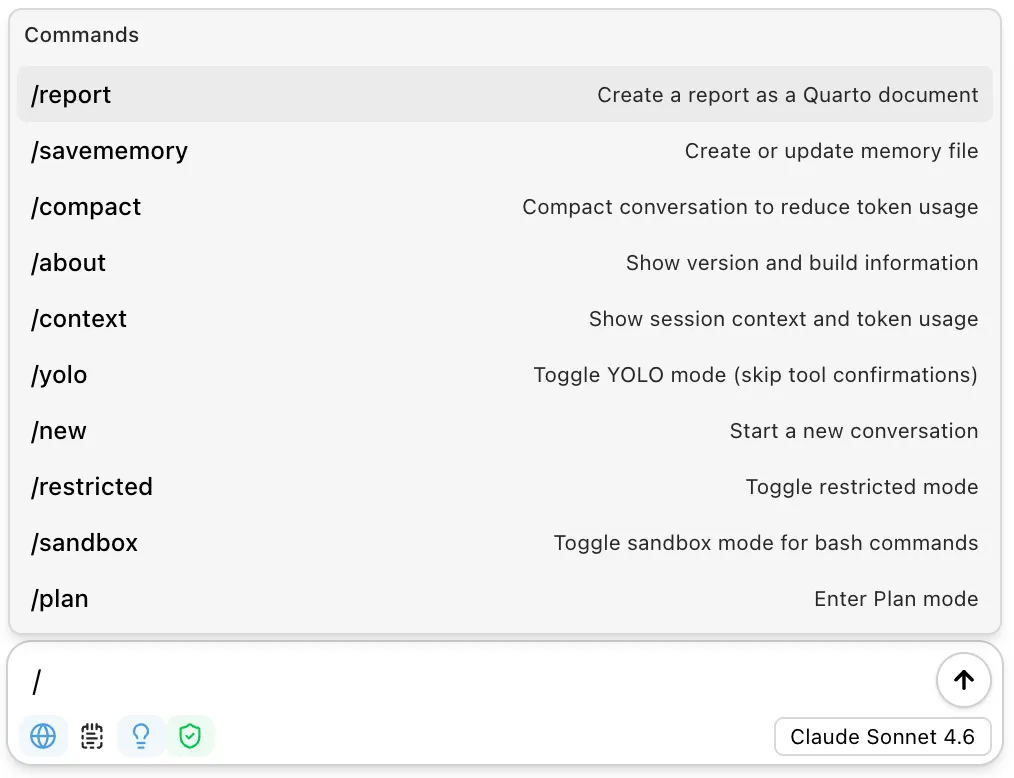
In addition, most skills can be run as /skill-name, so your own skills appear in the same menu. See the notes below for the exceptions.
Command Reference
| Command | Description |
|---|---|
/report | Create a Quarto document from the current conversation. Optionally add instructions after the command. |
/notebook | Export the conversation as a Jupyter notebook. |
/savememory | Create or update the project memory file. Add instructions to guide what gets saved. |
/compact | Summarize the conversation to reduce token usage. Previous messages are hidden but preserved. |
/microcompact | Replace tool results with placeholders to reduce token usage. |
/plan | Enter Plan mode to design an implementation approach before making changes. |
/new | Start a new conversation, restoring your preferred model settings if configured. |
/clear | Start a new conversation, keeping the current model, thinking effort, and web search settings. |
/context | Show session context and token usage for the current conversation. |
/plugin | Open the plugin & marketplace manager to browse, install, update, and enable plugins. Also available as /marketplace. |
/mcp | Open the session panel, which lists your MCP servers and their status, and lets you sign in to any that need authentication. |
/about | Show version and build information. |
/trust | Mark the current workspace as trusted. Required for memory files and project-level skills. |
/restricted | Toggle restricted mode. When enabled, every tool call requires confirmation. |
/sandbox | Toggle sandbox mode for shell commands. Uses OS-level isolation on macOS/Linux; on Windows, gates active-shell commands with a built-in allowlist. |
/yolo | Toggle automatic tool confirmation. When enabled, the assistant runs tools without asking. |
Usage
Commands can be used on their own or with additional instructions:
/report/report Focus on the visualization section and include the final plot code/savememory Remember that this project uses tidymodels for all modeling workNotes
/reportand/notebookuse thereportskill to generate documents./compactuses a fast model to summarize, so it completes quickly. The original messages are preserved — compaction just hides them from future requests./microcompactruns locally and does not send a message to the model. It is unavailable while the assistant is streaming.- Most skills can be run as a slash command (
/skill-name), including your own custom skills. Skills markeduser-invocable: falseare hidden from the menu, project skills need a trusted workspace, and if a skill’s name matches a built-in command, the built-in command takes precedence. See Skills for how invoking a skill differs from letting the assistant load it automatically.