Models
LLMs vary in capability, cost, and speed. Before starting a task with Posit Assistant, choose a model that suits your needs rather than using the same one for all tasks. Generally, you should choose the cheapest model capable of handling your task well. A lightweight, inexpensive model may be enough for routine work, while more demanding tasks may benefit from a more capable model.
You can access models by connecting Posit Assistant to a model provider with your own credentials, or access a selection through Posit AI Pass. This page highlights commonly used models and models we recommend, not every model you can use with Posit Assistant. The models available to you depend on your provider and account.
If you use Posit AI Pass, start with the Posit AI Pass column. Otherwise, look for the model family available through your provider. Use the table as a rough guide to choosing a model for your task and Posit Assistant’s model picker to switch models.
| Tier | Good for | Anthropic | OpenAI | Posit AI Pass | |
|---|---|---|---|---|---|
| Low | Quick changes, short conversations, simple exploratory analysis | Claude Haiku 5.5 | GPT 6 Luna | Gemini 3.8 Flash | Claude Haiku 5.5 DeepSeek V4.1 Flash GLM 5.3 Flash |
| Medium | Longer analyses, reports, routine code changes | Claude Sonnet 5.5 | GPT 6.1 Terra | Gemini 3.1 Pro | Claude Sonnet 5.5 GLM 5.3 Kimi K3.1 Pro Kimi K3 |
| High | Complex analyses, codebase-wide changes, difficult plans or reviews | Claude Opus 5.5 | GPT 6.1 Sol | Gemini 4 Argon | Claude Opus 5.5 |
Cost on a set of data analysis tasks
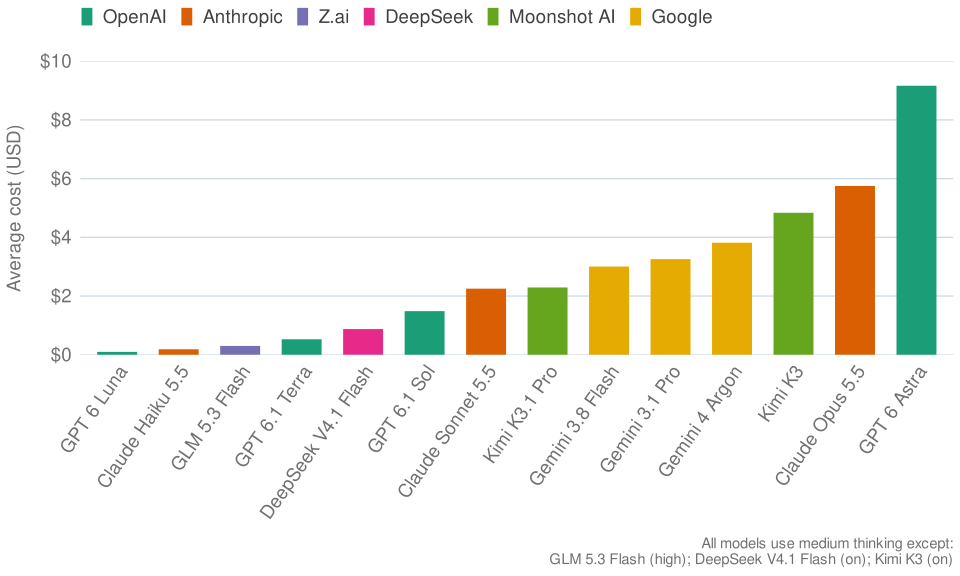
Costs are averaged across runs of the bluffbench2 data analysis benchmark. These benchmark runs used Posit Assistant rather than the benchmark’s own evaluation harness. Use this chart to get a sense of how model costs compare, and factor those differences into your model choice. Relative costs will vary with your task, conversation history, thinking settings, and other factors.
Posit AI Pass
Posit AI Pass curates a set of models that offer good performance for their price point. We look for models at or near the Pareto frontier.
The Pareto frontier consists of models for which no alternative performs at least as well for less, or better for the same price.
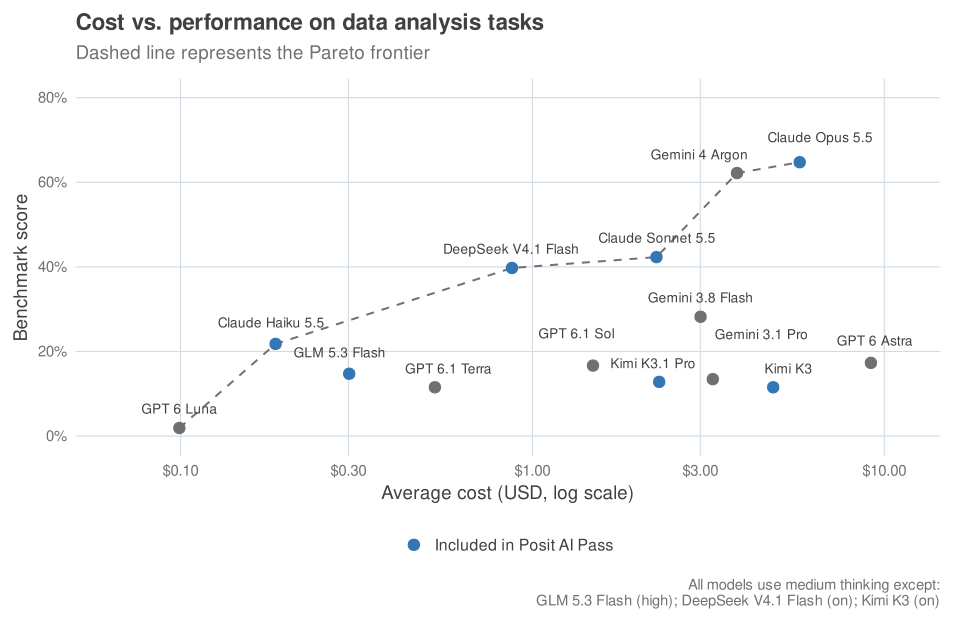
The dashed line marks the observed Pareto frontier among the models tested on bluffbench2. This is just one evaluation, but it gives a rough sense of the tradeoff between cost and performance on data science tasks. We use comparisons like this, alongside other evaluations and benchmarks, to help select models for Posit AI Pass.
Model reference
This table lists a selection of models, not every model you can use with Posit Assistant.
| Provider | Tier | Model | bluffbench2 cost | Token cost (input / output per million tokens) | Available on Posit AI Pass |
|---|---|---|---|---|---|
| Anthropic | Low | Claude Haiku 5.5Prompts over 100K tokens cost 5x as much per token. | $0.19 | $0.10 / $0.50 Cache read: $0.01Token prices per million tokens (input / output) Up to 100,000 input tokens$0.10 / $0.50Cache read: $0.01 Above 100,000 input tokens$0.50 / $2.50Cache read: $0.05 | Yes |
| Anthropic | Medium | Claude Sonnet 5.5 | $2.25 | $2 / $10 Cache read: $0.10 | Yes |
| Anthropic | High | Claude Opus 5.5 | $5.75 | $4 / $20 Cache read: $0.20 | Yes |
| OpenAI | Low | GPT 6 Luna | $0.10 | $0.10 / $0.50 Cache read: $0.01Token prices per million tokens (input / output) Up to 272,000 input tokens$0.10 / $0.50Cache read: $0.01 Above 272,000 input tokens$0.20 / $0.75Cache read: $0.02 | No |
| OpenAI | Medium | GPT 6.1 Terra | $0.53 | $1 / $5 Cache read: $0.05Token prices per million tokens (input / output) Up to 272,000 input tokens$1 / $5Cache read: $0.05 Above 272,000 input tokens$2 / $7.50Cache read: $0.10 | No |
| OpenAI | High | GPT 6.1 Sol | $1.49 | $2 / $10 Cache read: $0.10Token prices per million tokens (input / output) Up to 272,000 input tokens$2 / $10Cache read: $0.10 Above 272,000 input tokens$4 / $15Cache read: $0.20 | No |
| OpenAI | Extra high | GPT 6 Astra | $9.16 | $10 / $50 Cache read: $1Token prices per million tokens (input / output) Up to 272,000 input tokens$10 / $50Cache read: $1 Above 272,000 input tokens$20 / $75Cache read: $2 | No |
| DeepSeek | Low | DeepSeek V4.1 FlashFast and inexpensive. Vision-capable. (DeepSeek V4.1 Flash 1017) | $0.87 | $0.30 / $1.20 Cache read: $0.007 | Yes |
| Low | Gemini 3.8 Flash | $3.01 | $0.75 / $3.75 Cache read: $0.075 | No | |
| Medium | Gemini 3.1 Pro | $3.26 | $2 / $12 Cache read: $0.20 | No | |
| High | Gemini 4 Argon | $3.82 | $2 / $10 Cache read: $0.10 | No | |
| Moonshot AI | Medium | Kimi K3Balanced and capable. | $4.84 | $3 / $15 Cache read: $0.30 | Yes |
| Moonshot AI | Medium | Kimi K3.1 ProFrontier-level capability at a moderate price. Vision-capable. | $2.29 | $2 / $10 Cache read: $0.20 | Yes |
| Z.ai | Low | GLM 5.3 FlashFast and inexpensive. Vision-capable. | $0.30 | $0.15 / $0.50 Cache read: $0.03 | Yes |
| Z.ai | Medium | GLM 5.3Capable and economical. Not vision-capable. | — | $1.40 / $4.40 Cache read: $0.14 | Yes |